
How to build a wholesale sales site: moving from a dealer page to a real digital catalog
Building a wholesale sales site isn't a platform choice. It's four parts built in the right order: catalog, dealer segmentation, quote flow, ERP connection.
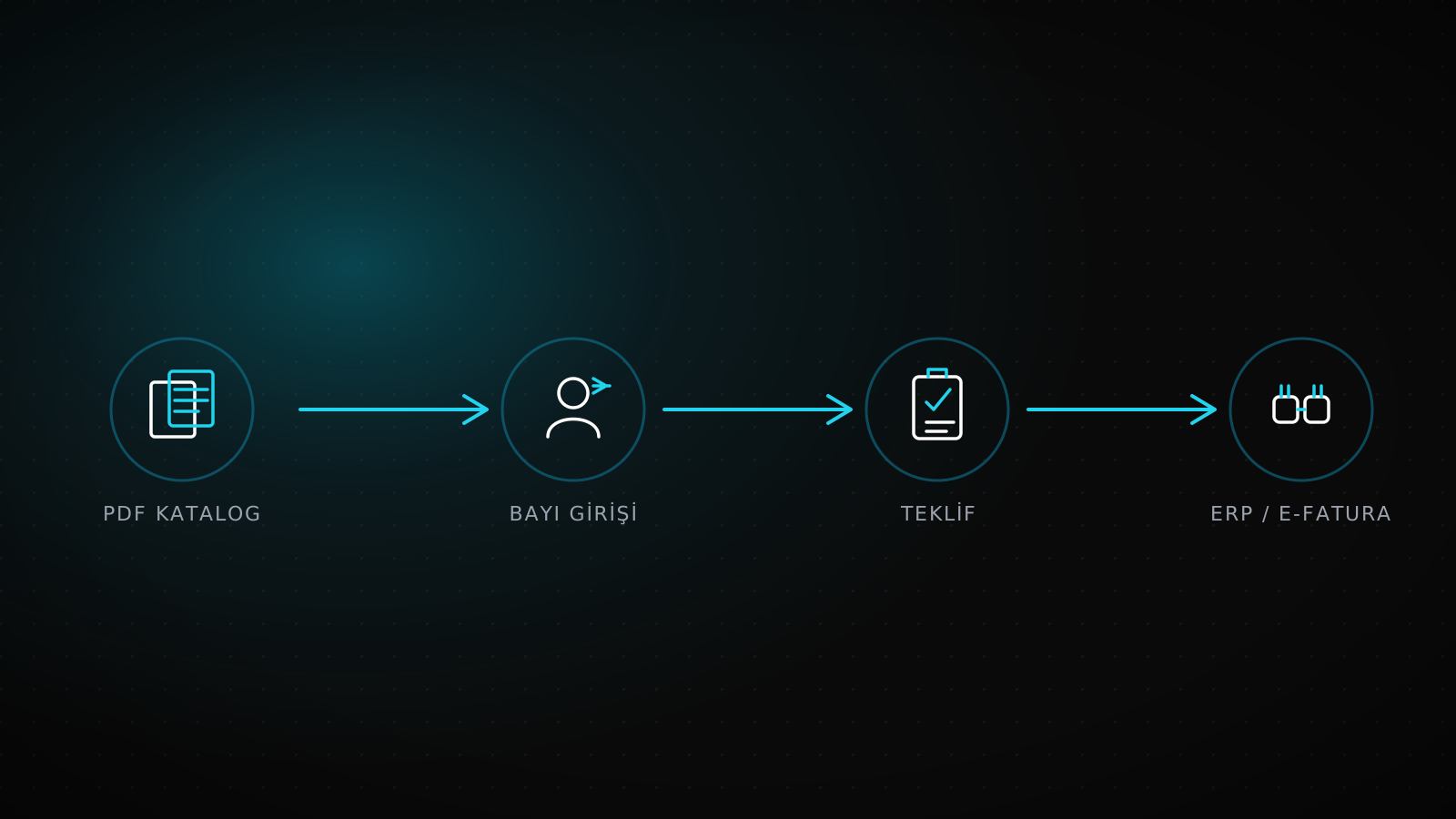
Building a wholesale sales site is a different question from building a general e-commerce site: the answer isn't which platform, it's the order four parts get built in. First the product catalog moves from a PDF into structured, searchable pages. Then dealer and customer segmentation gets set up, deciding who sees which price. Next a quote form replaces phone calls and email threads, and finally that flow connects to the ERP and e-invoicing system. Skip the order, say by publishing a price on the site before segmentation exists, and a dealer and a retail customer see the same number, which damages the dealer network on the spot.
Summary
A wholesale sales site is built from four parts: a digital product catalog, dealer/customer segmentation, a quote form, and an ERP/e-invoice connection. Order matters; opening price visibility before segmentation exists damages the dealer network. A generic e-commerce setup guide doesn't cover these four parts because it's written for a retail customer, not a wholesale one.
Where the cost of moving dealer orders from phone to web actually comes from
At a wholesale firm that sends its catalog as a PDF over WhatsApp, the price gets recalculated every time someone asks for it; the sales team quotes the same product at different discounts to different dealers over the course of a day, and which dealer got which number lives in a spreadsheet, or more often, in someone's memory. Phone orders mean stock entered by hand and delayed confirmation; when a dealer orders something out of stock, it usually surfaces only once the shipment is supposed to go out. The loss doesn't come from one line item. It comes from a dealer quoted the wrong price, an order someone forgot, and every manually entered invoice line being another chance for an error.
That loss isn't a missing piece of software. It's the catalog and the price not living in a digital system at all. For firms exporting in multiple languages, the same question gets a layer more complex; we cover that side in our multilingual corporate website guide.
What separates a dealer page from a real wholesale digital catalog
"Building a dealer page" and "building a wholesale digital catalog" aren't the same thing. The first usually bolts a login screen onto a static product showcase. The second builds a system where price, order, and approval change depending on who's looking.
| Component | Classic dealer page | Wholesale / B2B digital catalog |
|---|---|---|
| Access | Open to anyone, dealer login is cosmetic | Different catalog and price visibility by customer type |
| Price visibility | One list price, everyone sees the same number | Segment-based price: retail, standard dealer, high-volume |
| Order/quote flow | Phone or email, tracked by hand | Online quote form, a defined approval step, a kept history |
| Stock and catalog updates | A new PDF gets sent out, the old version keeps circulating | One catalog updated from a single source, everyone sees the same version |
| ERP/e-invoice connection | None, orders get typed into the ERP by hand | An approved quote flows into stock and invoicing automatically |
The difference isn't a design choice, it's an architecture decision. A classic dealer page is a retail e-commerce template with a login bolted on. A wholesale digital catalog is built from the ground up around behavior that changes by customer type.
How these parts played out on a real project
For Truexim, a foreign-trade firm, the corporate site, an internal intranet module, and mail automation run as one operation; quote and customer processes got standardized, and an international search module tracks business opportunities across countries from a single panel. At Wind-Mill, an industrial ventilation firm, the contact and quote flow got reduced to one form; whatever a dealer or customer fills in turns directly into a trackable quote.
100/100
Truexim's SEO Lighthouse score, with search infrastructure built from zero
3 modules
Truexim's corporate site, intranet, and mail automation merged into one panel
One form
Wind-Mill's contact and quote flow got reduced to a single form
Source: the Truexim and Wind-Mill builds, both shipped under the same corporate website scope.
Build order: four steps from catalog to ERP connection
Order matters because each step builds on the one before it. Open price visibility before segmentation exists, or turn on a quote form before segmentation exists, and the same mistake repeats in a different shape: the wrong price reaching the wrong customer.
Product catalog
Move from a PDF to structured, searchable product pages; one record per product, one place to update it
Dealer/customer segmentation
Define visible price, minimum order quantity, and approval rule by customer type
Quote form
A dealer's selected products become one quote, and who approves it is defined
ERP/e-invoice connection
An approved quote flows into stock and invoicing without manual entry
Starting the fourth step before the first three exist usually backfires: the ERP connection is there, but there's no clean segmentation or quote data to connect it to, so the integration stays half-built.
Dealer segmentation: who should see which price
This is the decision generic e-commerce setup guides skip: defining a different price and a different approval step for the same catalog, by customer type.
Retail / new customer
List price shows directly
No approval step; order completes by card or cash on delivery
Standard dealer
Discounted price shows after dealer login
Minimum order quantity applies, payment-term approval goes through sales
High-volume / export dealer
No fixed price, set through a quote
Once approved, the quote connects automatically to the dealer's ERP account
These three tiers don't need the same names at every firm. What matters is that the tiers exist, and which tier sees which price is defined in the system, not kept in one person's memory.
When this investment isn't needed yet
If the dealer count is still in the single digits and price changes are rare, full segmentation and an ERP connection may be premature. In that case, starting with a static, up-to-date digital catalog while still taking orders by phone or email is an honest starting point; segmentation and a quote form should come in once the dealer count grows or price disputes, two dealers quoted different numbers, start happening often. Building the full scope while the dealer count is still small means buying complexity before it's needed.
Frequently asked questions
What's the difference between a wholesale sales site and a regular e-commerce site?
A regular e-commerce site is built for one price and one customer type. A wholesale sales site carries different price visibility, minimum order rules, and an approval step by customer type; that difference comes from the system's design, not the platform choice.
Which step comes first, the catalog or the ERP connection?
The catalog. An ERP connection built before clean product and segmentation data exists stays half-finished; the order starts with digitizing the catalog.
Can the dealer price just be shown to everyone on the site?
It can, but that makes the segmentation pointless: retail customers see the dealer price too, and the dealer network starts buying at that number. Price visibility should open only after segmentation exists.
Which systems does the ERP connection work with?
Common ERPs like Logo, Mikro, Netsis, and Zirve can connect so an approved quote flows into stock and e-invoicing automatically; which ERP is in use doesn't change the integration's scope or the build order.
Can you start with a few dealers and grow later?
Yes. Starting with a static catalog and adding segmentation and a quote form once the dealer count grows carries less risk than building the full scope up front; if the catalog's structure is built right, adding segmentation later doesn't require rewriting the architecture.
These four steps get built together under a corporate website scope. For firms exporting and needing a multilingual structure, we cover the right language and URL setup in our multilingual corporate website guide, and the technical side of the ERP connection in our e-commerce ERP integration guide.