
Exporting Lovable code to GitHub: what travels and what stays
Getting the code out takes two minutes. The database, the users, the uploaded files and every secret stay in the hosted project. Here is the part nobody writes down.
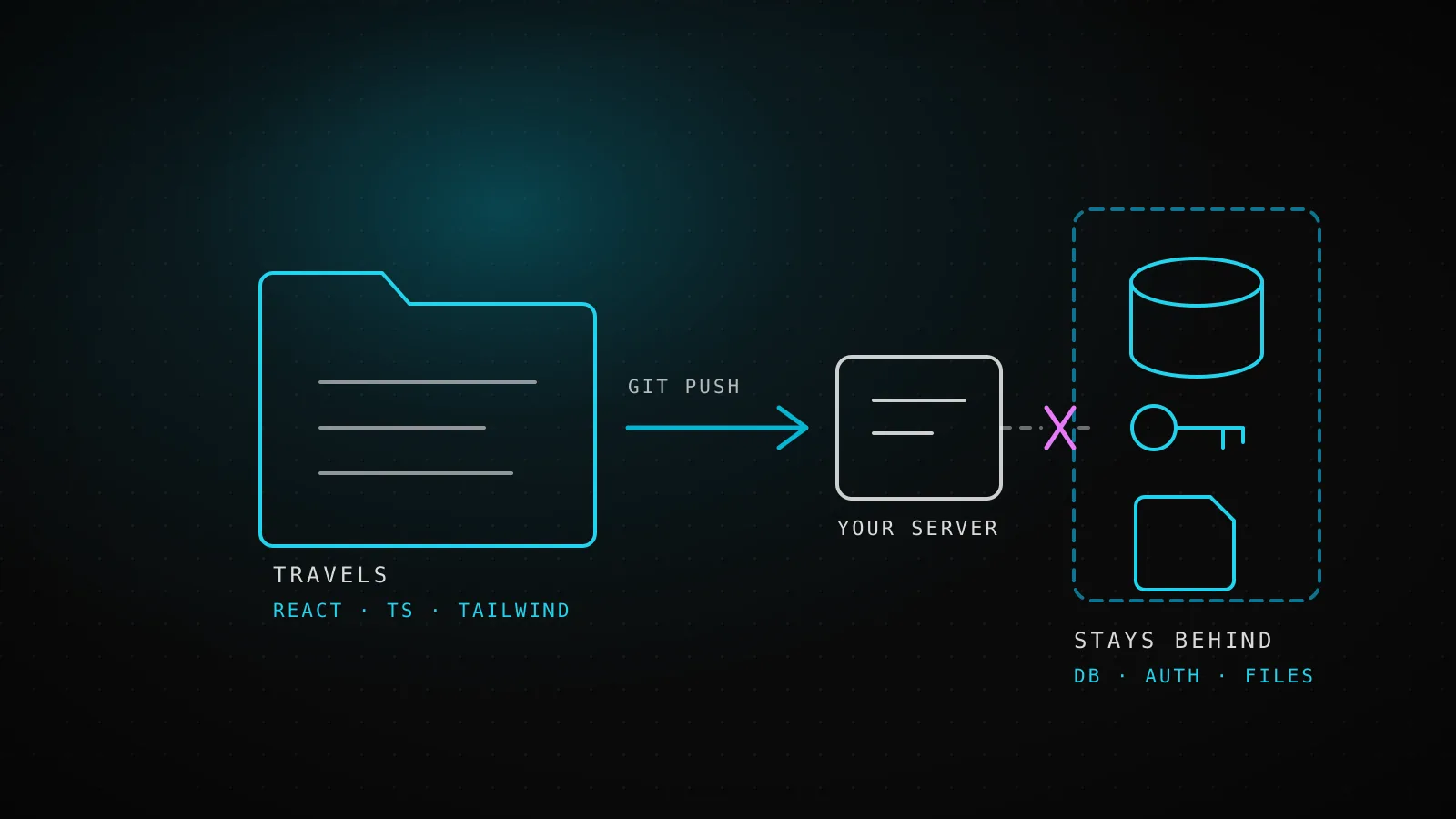
There are two ways out of Lovable and both take minutes. Connect the project to GitHub from Project settings, Git, GitHub, or on a paid plan use Download codebase in the same place. What lands on your disk is ordinary React, TypeScript and Tailwind. What does not land is the database, the registered users, the uploaded files and every secret the app reads at runtime, because those live in the connected Supabase project and were never part of the code.
TL;DRExport the code, then rebuild the backend. Budget your time for the second half, not the first. Run the audit script below before you promise anyone a date.
Which way out should you take?
Both give you the same files. They differ in what happens next, and that is the only reason to care.
| GitHub connection | Download codebase | |
|---|---|---|
| Direction | Two way. Edits in Lovable push to the repo, pushes to the active branch flow back in. | One way. A snapshot, nothing syncs after it. |
| Who owns the repo | Created by Lovable, private by default, under your account or organization. | No repo. You create one yourself. |
| Branches | One branch at a time, the default branch unless you switch it. | Not applicable. |
| Going back | Disconnecting and reconnecting creates a new repository. The old link does not come back. | Download again whenever you like. |
Take the GitHub connection if you are still iterating in Lovable and want a real history while you decide. Take the download if you have already decided to leave. One caveat worth knowing before you plan a round trip: importing an existing GitHub repository back into Lovable is not supported. The path runs one way.
What is actually inside the folder?
A Vite project. Components, pages, hooks, a Tailwind config, a Supabase client module that reads two environment variables, and if the project used server-side logic, a supabase/ directory with migrations and edge function source. Nothing proprietary, nothing obfuscated. This part genuinely is yours and it runs anywhere Node runs.
That is also why the export feels anticlimactic. The folder builds, the dev server starts, and the app renders a login screen that cannot authenticate anybody.
What is not inside the folder?
This is the whole article in one picture. The left column moved to your machine. The right column did not move at all, and no amount of reading the code will reveal it.
supabase/migrations/, when they existsupabase/functions/The secret handling deserves a sentence of its own, because it is the one that surprises people. Values entered through the secure input are stored in the hosted project and are never read back, not even by the tool that asked for them. So there is no export button that produces them. If you did not write a value down when you typed it, it is gone and you reissue it.
How do you find what is missing before it breaks?
Reading the code to build this list by hand takes an afternoon and you will still miss one. We wrote a script that does it in a second. Drop it into the exported folder and run it. It reads what the code references, compares that against what is actually defined, and tells you which pieces exist only on the server you just walked away from.
# audit-export.sh - run inside the exported folder
SRC="${1:-.}"

echo "== 1. Env vars the code reads =="
grep -rhoE 'import\.meta\.env\.[A-Z_][A-Z0-9_]*|process\.env\.[A-Z_][A-Z0-9_]*' \
  "$SRC/src" "$SRC/supabase" 2>/dev/null \
  | sed -E 's/.*env\.//' | sort -u > /tmp/_used.txt
sed 's/^/  /' /tmp/_used.txt

echo "== 2. Which of them are defined anywhere =="
cat "$SRC"/.env "$SRC"/.env.* 2>/dev/null \
  | grep -oE '^[A-Z_][A-Z0-9_]*' | sort -u > /tmp/_have.txt
comm -23 /tmp/_used.txt /tmp/_have.txt | sed 's/^/    - /'

echo "== 3. Secrets that must never be client-side =="
grep -rniE 'service_role|SERVICE_ROLE_KEY|secret_key' "$SRC/src" 2>/dev/null | head -5

echo "== 4. Does the database schema travel with you? =="
ls "$SRC"/supabase/migrations/*.sql 2>/dev/null | wc -l

echo "== 5. Server-side functions =="
ls "$SRC"/supabase/functions 2>/dev/null
Here is what it prints against a sample export shaped the way these projects come out, with a Supabase client, a billing page and one edge function. The output below is a real run, not an illustration.
== 1. Env vars the code reads ==
  VITE_STRIPE_PUBLISHABLE_KEY
  VITE_SUPABASE_ANON_KEY
  VITE_SUPABASE_URL
== 2. Which of them are defined anywhere ==
  MISSING (app will start and fail at runtime):
    - VITE_STRIPE_PUBLISHABLE_KEY
    - VITE_SUPABASE_ANON_KEY
== 3. Secrets that must never be client-side ==
  clean
== 4. Does the database schema travel with you? ==
  NO migrations - the schema exists only in the hosted project
== 5. Server-side functions ==
  function: send-invite
  -> these are DEPLOYED artifacts; their secrets are not in this folder
Two of those lines are the whole migration. Section 2 is why the app compiles and then dies on first click. Section 4 is the difference between an afternoon and a week, because a project with no migration files has a schema that exists in exactly one place, and you rebuild it by reading the dashboard table by table.
What breaks the first time you run it locally?
In order, and all four are the same root cause wearing different messages.
- A blank page and a console error about an undefined URL. The Supabase client got
undefinedfor its two variables. Create.envand put the project URL and the anon key in it. - Login accepts nothing. You pointed at a project whose Authentication settings do not list your local address as a redirect URL. Add it.
- Queries return empty arrays instead of errors. Row level security is doing its job and no policy grants your role anything. An empty array is what a correctly locked table looks like from outside.
- A feature that worked yesterday returns 500. It called an edge function that is deployed on the old project and is not running against your new one.
None of these are bugs in the generated code. They are the shape of the hole the export left.
How do you stand the backend back up?
Decide first whether you are keeping the existing hosted project or building a fresh one. Keeping it is faster and is the right call if the data matters and the project is healthy. Rebuilding is right if you inherited something you do not trust.
If you keep it, the work is small: create the env file, add your new domain to the auth redirect list, and move on. If you rebuild, work in this order, because each step depends on the one above it.
- Schema first. Apply the migration files if they exist. If they do not, script the schema out of the old project and commit it, so this is the last time anyone does it by hand.
- Policies next. Every table gets row level security on and a policy written deliberately. This is the step people skip and it is the one that leaks.
- Then data. Export and import per table, respecting foreign key order.
- Then users. Auth users are their own migration, not a table copy.
- Then storage. Buckets, their contents, and their access policies, which are separate from table policies.
- Functions last, with their secrets reissued rather than copied, since the originals cannot be read back.
Deployment itself is the easy part. It is a Vite build, so any host that serves static output plus your environment variables will do. We usually land these on Vercel or on a Coolify instance the client owns, for the same reason the export happened: nobody wants to be locked in twice.
Which holes should you close while you are in there?
You are already touching every file. This is the cheapest moment you will ever have to fix the four things these codebases reliably get wrong, and every one of them is invisible while the app looks fine.
Check that row level security is enabled on every table and that each policy says what you think it says. Check that no service role key appears anywhere the browser can reach, which is what section 3 of the script is watching for. Check that storage buckets are not public unless the files genuinely are. Check that anything about who is allowed to do what is enforced on the server, not just hidden in the interface. A button that is not rendered is not a permission.
What does the finished migration look like?
Six things are true when this is done. Not five.
.env.example lists every variable the code reads.When should you not do this yourself?
If the app has no users yet and no data worth keeping, do it yourself. The list above is a weekend and you will understand your own system better afterwards.
Stop and get help when any of these is true: the app already takes money, real user records exist that you cannot lose, or the project has no migration files and a schema large enough that reading it table by table is a project of its own. The failure mode here is not a broken build, which you would notice. It is a quiet one, a table left readable, a bucket left public, a policy that looks right and is not. If you want the review before the move rather than after, that is what our AI project completion work is, and the code review comes first.
Also worth reading if you are deciding where the code should land rather than how to get it out: our WordPress versus Next.js decision matrix covers the same trade off from the platform side.
Frequently asked
Can I export without connecting GitHub? Yes. Download codebase in Project settings, Git, on a paid plan, or from the code editor sidebar.
Do I own the code? Yes. It is standard React, TypeScript and Tailwind, and the repository sits under your account.
Will my database come with it? No. The database, users, files and secrets stay in the hosted project. Only migration files, when they exist, describe the schema.
Can I push the code back in after editing it locally? With the GitHub connection, yes, on the active branch. Importing an unrelated existing repository is not supported.
What if I disconnect GitHub and reconnect later? You get a new repository. The previous link is not restored, so treat disconnecting as a one way action.
How long does the whole migration take? Getting the code out is minutes. Standing the backend back up is anywhere from an afternoon to a week, and section 4 of the script above is the single best predictor of which one you are in for.